


Alarm Clock: Alarm App & Sleep
4.268.00 Reviews
App Specs
- Version
- 1.25.1
- Updated On
- License
- Free
- Downloads
- 500,000+
- Developer
- Revoke
- Categories
- Productivity
- Platform
- Android
Screenshots
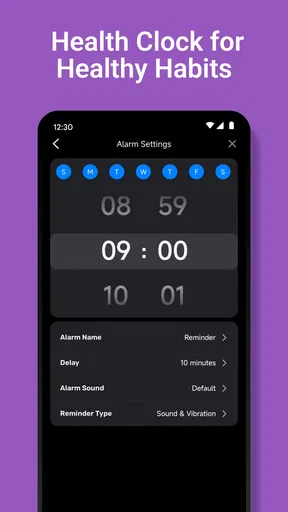

 Analysis by AppCompare
Waking up on time is easy until the alarm becomes part of the problem. A soft tone can disappear into heavy sleep, while a complicated alarm routine can make mornings feel like a small technical project. Alarm Clock: Alarm App & Sleep takes a more direct approach: it is a free productivity app from Revoke built around making the alarm noticeable, repeatable, and easier to fit into a real sleep schedule. After using it, I see its main value less as a decorative clock and more as a dependable wake-up tool for people who regularly sleep through ordinary alerts.
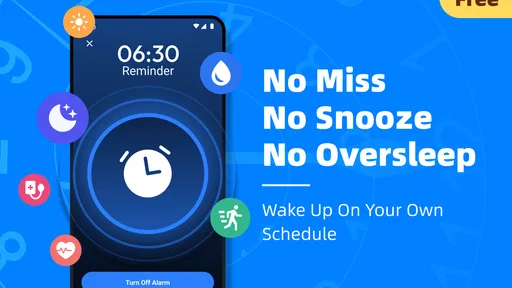
The central capability is its focus on a loud alarm for heavy sleepers. That sounds simple, but it changes how I think about the app. Instead of trying to turn the morning into a game or burying the important controls under a large sleep-tracking system, it puts attention on the moment when the phone needs to get through to me. Sleep reminders, repeat options, and custom tones support that same purpose. They are not separate attractions; they help create a routine in which the alarm is less likely to be forgotten, ignored, or dismissed half-awake.
How the loud-alarm approach feels in everyday use
The first useful distinction is between an alarm that is merely scheduled and one that is designed to interrupt sleep. A standard phone alarm may work perfectly for a light sleeper, yet fail when the phone is under a pillow, placed across the room, or competing with a noisy environment. In my experience, the appeal here is the ability to treat volume and tone as part of the wake-up plan rather than as an afterthought.
Custom tones are especially practical because people react differently to sound. A gentle chime may be pleasant but ineffective for someone who sleeps deeply. A sharper or more familiar sound can be harder to ignore. I would not assume that the most aggressive tone is automatically best, though. The sensible approach is to test a sound during the day, at the same volume you expect to use overnight, and choose one that is clearly noticeable without being needlessly stressful. That small test can prevent a frustrating first morning.
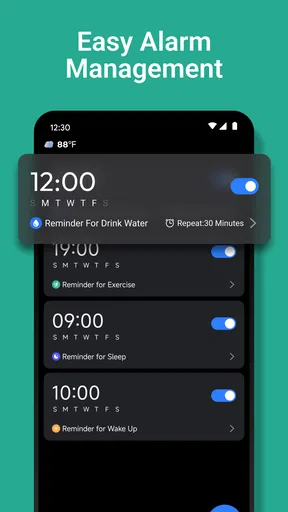
The repeat function also deserves more attention than it usually gets. Repeating an alarm is useful when the first alert is intended to begin the waking process rather than guarantee that I am instantly out of bed. For example, I might set an initial alarm for the time I want to wake and allow another alert to follow if I silence the first one while still drowsy. The trade-off is obvious: repeated alarms can become background noise if they are too frequent or used without discipline. I get the best result when each repeat has a purpose, instead of creating a long chain that trains me to dismiss everything.
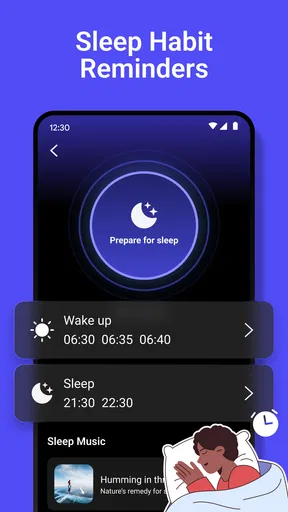
Sleep reminders work earlier in the routine. They address the part many alarm apps overlook: waking up is harder when bedtime keeps moving later. A reminder can act as a prompt to stop scrolling, finish a task, or begin winding down. It cannot make me sleep, but it can give the evening a boundary. That is a meaningful difference from relying only on a morning alert and then wondering why the alert feels impossible to answer.
One useful workflow is to separate the reminder from the alarm mentally. The reminder is for protecting tomorrow morning; the alarm is for getting me out of sleep. If I treat both as the same notification, I am more likely to dismiss the earlier one and forget it. When I use the reminder as a signal to prepare—plug in the phone, choose the tone, and settle down—the morning alarm becomes the final step of a plan rather than a desperate rescue.
Worth Reading Before You Choose

EA SPORTS FC Mobile 26 Is a Bigger Football Game, but It Takes Time

Flipboard Shows What News Apps Must Do Beyond the Feed

Switching to Android Auto Means Rethinking Your Driving Routine

Google Calendar Makes a Crowded Week Easier to Manage

Ludo King Makes the Most of the Minutes Between Plans

Baby Panda World Brings Quick Play to Modern Phones, but Its Game Library Feels Busy
A realistic morning routine
Imagine someone who starts work early but does not wake reliably from a standard ringtone. In the evening, that person can use a sleep reminder as a cue to finish up, then set a custom alarm tone suited to deep sleep. A repeat can provide a second chance without requiring a completely separate alarm application. The phone can be placed where the sound is audible but not so close that a half-asleep tap ends the morning immediately.
That setup is not magic, and it still depends on sensible phone placement and a consistent bedtime. What the app contributes is a compact sequence: remember to prepare for sleep, create a noticeable wake-up signal, and allow a repeat when one alert is not enough. I find that more useful than having many unrelated options that I never touch.
There is also a practical reason to keep the arrangement simple. When I am tired, I do not want to navigate a complicated dashboard or make several decisions before setting tomorrow’s alarm. An app centered on the alert itself is easier to understand: choose the time, decide whether a reminder or repeat is appropriate, and select a tone that I know I can hear. The less mental effort required at bedtime, the more likely I am to use the routine consistently.
At the same time, users should approach any phone-based alarm with basic caution. A phone that is muted, out of battery, or placed somewhere that blocks its speaker can undermine even a well-designed alarm. I would charge the device before sleeping and avoid covering the speaker. Those are not special requirements of this app; they are sensible habits for anyone who depends on a mobile alarm.
Where it is stronger than a normal phone alarm
The usual built-in alarm is often enough for occasional wake-ups, but it may feel limited when the problem is recurring. Alarm Clock: Alarm App & Sleep is more appealing when I need the alarm to be part of a repeatable routine rather than a one-off reminder. The combination of loud alerts, custom tones, repeats, and sleep reminders gives me more control over the path from evening preparation to morning wake-up.
It also occupies a different space from full sleep-tracking applications. Sleep trackers can be valuable when I want information about rest patterns, but they may introduce charts, sensors, bedtime analysis, and a larger setup. If my only urgent question is “Will I hear the alarm?” that extra layer can be unnecessary. Revoke’s app is better suited to a person who wants a focused alarm tool and does not need a broad sleep journal.
On the other hand, a built-in alarm can be preferable for someone who wants the fewest installed apps and already wakes reliably. There is no reason to replace a simple tool that is working. I would choose this app when the standard solution has failed me repeatedly, when I want a custom sound, or when a reminder to begin winding down would make my schedule more realistic.
The app’s free price lowers the barrier to trying it. That matters for a utility whose value is personal: one person may immediately notice a difference, while another may find the regular phone alarm perfectly adequate. I can test the routine without treating the decision as a major purchase, then keep it only if it improves actual mornings.
Small habits that make the main feature more reliable
The first habit is to test the chosen tone while awake. I would set a short-term alarm, place the phone where it will normally sit, and listen from the bed or another nearby position. This reveals whether the sound is noticeable in the room and whether the selected volume feels reasonable. It is a better test than assuming a tone will work simply because it sounds loud in the settings screen.
The second is to use repeats as a backup, not as a substitute for getting up. If every morning contains several repeated alerts, I may start dismissing them automatically. A more effective arrangement is to keep the first alarm meaningful and use a repeat only when there is a genuine risk of falling back asleep. This preserves the urgency of the sound instead of turning it into a familiar part of the background.
The third is to make the sleep reminder actionable. I would not treat it as another notification to swipe away. When it appears, I can use it as a checklist: finish the current task, prepare clothes or essentials, connect the charger, and set the next alarm. The reminder becomes valuable because it triggers behavior, not because it exists on the screen.
A fourth consideration is tone selection for shared spaces. A very forceful sound may be appropriate for a person sleeping alone, but it can disturb a partner, roommate, or family member. In that situation, the app may still help through a carefully chosen custom tone and better phone placement, but a loud alarm is not automatically the most considerate answer. Someone sharing a bedroom should weigh the need to wake against the likely effect on everyone nearby.
Travel is another situation where the app can be useful but needs preparation. A new room may have different acoustics, background noise, and charging arrangements. I would avoid waiting until the first morning away to discover that the phone is hidden under bedding or that the chosen tone is too familiar to catch my attention. A quick daytime check and a deliberate placement can make the loud-alarm capability more dependable.
Friction and reasonable limitations
The strongest feature can also be the most disruptive. A loud alarm is effective because it demands attention, but that may feel harsh for light sleepers or people who wake easily. If I only need a gentle nudge, this app’s main emphasis may be more than I want. The right choice depends on the problem: missed alarms call for stronger intervention, while a delicate morning routine may benefit from something quieter.
Repeats can create another kind of friction. They offer reassurance, but they can also encourage snoozing by default. I would be careful not to build a schedule that makes the first alarm optional. The app can support a backup plan, but it cannot replace a consistent sleep pattern or the decision to stand up when the alert sounds.
Custom tones require a little personal judgment too. A tone that wakes me on one night may become easy to ignore after repeated use. Changing it occasionally could restore attention, but constantly changing sounds may make the routine less predictable. I prefer keeping one dependable tone for normal days and reserving another for situations where waking on time is especially important.
The app is also not the best match for every kind of sleep concern. If I want detailed sleep analysis, long-term trend reports, or a broader wellness system, I would look toward a dedicated sleep-tracking product instead. If I need an alarm that requires a physical task before dismissal, I would check whether a different alarm style better fits that need. Alarm Clock: Alarm App & Sleep is strongest when the core challenge is hearing and organizing the alert, not measuring or diagnosing sleep.
Because the developer is Revoke and the current version is 1.25.1, I would still keep expectations practical: a version number does not turn a simple alarm into a complete sleep-management system. The app’s value is in execution of its central job. I would judge it by whether I hear the alert, whether the reminder supports my bedtime, and whether the controls fit naturally into my evening.
Who will gain the most from it
This is a particularly sensible choice for heavy sleepers, people who regularly silence alarms without remembering it, and anyone whose work, school, travel, or appointments make late waking costly. It can also suit users who want a dedicated productivity tool for mornings without installing a full sleep-analysis platform. The Everyone content rating makes it broadly approachable, and its minimum operating-system requirement of Android 8.0 keeps it relevant to many older devices as well as newer ones.
The app has already reached over 500 thousand installs, with an average rating of 4.2 from around 900 ratings. I read that as a sign of meaningful user interest rather than proof that every sleeper will respond to it in the same way. An alarm is intensely personal: room size, sleeping habits, phone placement, and tolerance for sound all affect the result. The numbers provide useful context, but my own test would matter more.
It is also worth considering the developer’s position in the decision. Revoke has kept the product focused enough that I can understand its purpose quickly. That clarity is a strength for someone who wants to set an alarm and move on. It may feel too narrow for users who expect one app to manage every part of bedtime, sleep quality, and morning planning.
I would skip it if my existing alarm already wakes me reliably and I dislike extra reminders. I would also be cautious if a loud sound could create problems for someone sharing my room. In those cases, a quieter built-in alarm, a wearable, or a more specialized solution may be more appropriate. Choosing the strongest alert available is not always the same as choosing the best alarm for the household.
For me, the most convincing reason to keep using it is the way its features connect around one real problem. The reminder helps me prepare, the custom tone helps the alert stand out, and the repeat gives me a controlled fallback. None of those elements guarantees a perfect morning on its own, but together they form a practical routine that is easier to repeat than a collection of disconnected workarounds.
As a free app in the productivity category, Alarm Clock: Alarm App & Sleep earns a recommendation from me for people who sleep through ordinary phone alarms or need more structure around bedtime. I would start with one carefully tested alarm, one sensible repeat, and a reminder that leads to an actual evening action. If the problem is failing to notice the alarm, this focused approach is more useful than a crowded sleep dashboard. If the problem is deeper sleep disruption or a need for detailed health insight, I would choose a different kind of tool. For the right user, though, this app turns a basic phone into a more deliberate and noticeable morning routine.
Pros
- Multiple alarm schedules make it easy to manage workdays and weekends.
- Sleep-focused tools can encourage a more consistent bedtime routine.
- Custom alarm sounds help make wake-ups more personal.
- Clear controls let users adjust alarm times quickly.
- Useful for people who need reminders beyond a standard clock app.
Cons
- Some advanced features may require a subscription or in-app purchase.
- Frequent alarms can be easy to overlook if notification access is restricted.
- Battery optimization settings may interfere with reliable alarm delivery.
- Extra sleep features may feel unnecessary for users wanting a basic alarm.
- Permissions for notifications and background operation may concern privacy-minded users.
FAQs for Alarm Clock: Alarm App & Sleep
What is Alarm Clock: Alarm App & Sleep?
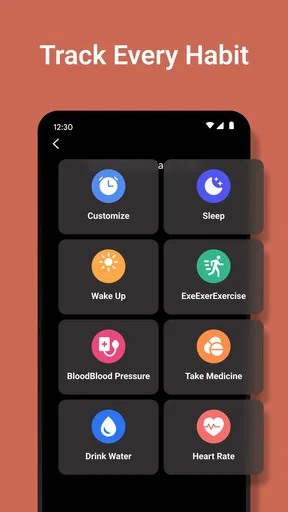
Alarm Clock: Alarm App & Sleep is a mobile alarm and sleep-management application designed to help users wake up on time and build more consistent routines. Besides standard alarms, it may include customizable sounds, repeating schedules, sleep-related tools, and bedtime reminders. Its exact features can vary by device, operating-system version, and the subscription plan selected.
Can I customize alarms and use different wake-up schedules?
Yes, the app is intended to support flexible alarm setup for different routines. You can generally create alarms for specific times, choose repeat days, adjust tones or volume, and label alarms so they are easier to identify. This is useful for separating workdays, weekends, travel, or exercise schedules. Before relying on it, check that notifications and alarm permissions are enabled.
Does Alarm Clock: Alarm App & Sleep track sleep automatically?
Sleep features may provide bedtime guidance, sleep reminders, or tracking tools, depending on the version of the application and the permissions you grant. Sleep tracking results should be treated as general wellness information rather than medical advice, because phone sensors and user-entered data cannot replace professional monitoring. Review the privacy settings before allowing access to health, motion, or microphone data.
Is Alarm Clock: Alarm App & Sleep free to download?
The application may be available to download at no initial cost, but some functions can be restricted behind advertising, in-app purchases, or a premium subscription. These commonly include advanced sounds, additional sleep tools, customization options, or an ad-free experience. Carefully read the store listing and subscription screen, especially the renewal terms, trial duration, and cancellation procedure before confirming payment.
What should I do if an alarm does not ring?
If an alarm fails to sound, first verify the alarm time, repeat settings, device volume, and selected sound. Also check that the app has notification or alarm permissions and is not restricted by battery-saving, focus, silent, or do-not-disturb settings. Some phones limit background activity, so add the app to the permitted list if necessary. Test a new alarm before depending on it.


